Saturday, July 27, 2019

MongoDB 4.0 on Ubuntu 18.04 bionic


MongoDB is a cross-platform document-oriented database program. 
Classified as a NoSQL database program, MongoDB uses JSON-like documents with schema. 
Source: Wikipedia

MongoDB 4.0 was released on 2018-08-06

New 'wow' features of MongoDB 4.0:

  • multi-document ACID transactions
  • data type conversions
  • 40% faster shard migrations
  • non-blocking secondary replica reads

And some other niceties:
  • native visualizations with MongoDB Charts
  • Compass aggregation pipeline builder
  • Stitch serverless platform
  • SHA-2 authentication
  • Mobile database
  • HIPAA compliance to the MongoDB Atlas database service
  • free community monitoring service
  • Kubernetes integration

While the new features in MongoDB 4.0 are great, 
the latest Ubuntu version 18.04 official repository still installs MongoDB version 3.6

To get the current version of MongoDB
> mongo --version

To install MongoDB version 4.0, you need to install from MongoDB's repository.

Instructions to install MongoDB 4.0 and some hurdles I encountered follow:

1) Add the MongoDB repo
> sudo vi /etc/apt/sources.list.d/mongodb-org-4.0.list  
deb [arch=amd64] https://repo.mongodb.org/apt/ubuntu bionic/mongodb-org/4.0 multiverse  

2) Add MongoDB the repo key
> sudo apt-key adv --keyserver hkp://keyserver.ubuntu.com:80 --recv 9DA31620334BD75D9DCB49F368818C72E52529D4

3) Update your system
> sudo apt-get update

4) Install MongoDB 4.0
> sudo apt-get install mongodb-org

5) Status and restart MongoDB
> sudo systemctl status mongod
> sudo systemctl restart mongod

Hurdles:
If MongoDB does not start, there may be some issues with removing the prior MongoDB version.

Errors I encountered:
error processing archive /var/cache/apt/archives/mongodb-org-server_4.0.10_amd64.deb (--unpack):
error trying to overwrite '/usr/bin/mongod', which is also in package mongodb-server-core 1:3.6.3-0ubuntu1.1
error trying to overwrite '/usr/bin/mongos', which is also in package mongodb-server-core 1:3.6.3-0ubuntu1.1
error trying to overwrite '/usr/bin/bsondump', which is also in package mongo-tools 3.6.3-0ubuntu1

Some potential fixes
> sudo apt --fix-broken install
This by it self did not help

Remove prior MongoDB and other unused packages
> sudo apt autoremove
This did fix the issue and allow me to run MongoDB 4.0

To get version of MongoDB
> mongo --version

Also, if you accidentally tried to get the version from the daemon
> mongodb --version  
MongoDB will start as your user, often sudo/root,
which may cause some MongoDB files to be created as root.

You may have to reset user/group permissions
> sudo chown -R mongodb:mongodb /data/mongodb/


-End of Document-
Thanks for reading

Monday, June 17, 2019

Clear out old MSMQ messages

Microsoft Message Queuing or MSMQ is a message queue implementation developed by Microsoft and deployed in its Windows Server operating systems.

MSMQ is essentially a messaging protocol that allows applications running on separate servers/processes to communicate in a failsafe manner. A queue is a temporary storage location from which messages can be sent and received reliably, as and when conditions permit. This enables communication across networks and between computers, running Windows, which may not always be connected. By contrast, sockets and other network protocols assume that direct connections always exist.

Source: Wikipedia

If everything is working, messages are added to the queue by one application, and then typically read and removed from the queue by another application.

However, sometimes messages will get 'stuck' in the queue. While this is sometimes due to networking or application changes, the queue may back up if the receiving application is not running or running slower than normal.

Once the underlying problem has been fixed, depending on your application, the receiving application may never be able to catch up with the quantity of messages currently in the queue plus those still being added.

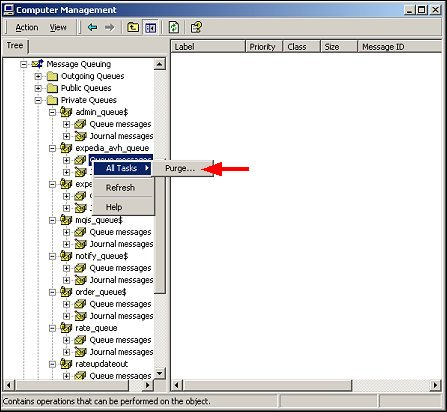
While you can purge the full queue:
Computer Management -> Services and Applications -> Message Queuing
Select your private queue, right click, All Tasks -> Purge


You may want to only purge the "old" messages.
Depending on your application, "old" could be seconds, minutes or hours.

The following PowerShell script will iterate over your private queues and remove "old" messages.
You can set the definition of "old" and you can preview the messages without removing.

###
# remove old messages for all local msmq queues
# msmq = microsoft messaging queuing
#
# 20190530 122800
#   add options $showMsg and $dryRun
# 20190521 122800
#   initial
#

#
# config
#
[System.Reflection.Assembly]::LoadWithPartialName("System.Messaging") | Out-Null
$utf8 = new-object System.Text.UTF8Encoding
$now = Get-Date
# remove messages older than
# $old = $now.AddDays(-1)
$old = $now.AddMinutes(-10)
# show details of message to be removed
$showMsg = 1
# run without removing
$dryRun = 1

#
# run
#

# get queues
$queuePaths = Get-MsmqQueue -QueueType Private | Select -Property QueueName;
if ($dryRun)
{
    echo "dry run; would be "
}
echo "removing old messages for all local msmq queues"
echo ""
echo "nbr queues: $($queuePaths.Length); checking messages older than $($old)"
$queueCounts = Get-MsmqQueue -QueueType Private | Format-Table -Property QueueName,MessageCount;
echo $queueCounts
echo ""
pause
foreach ($queuePath in $queuePaths)
{
    # for proper permissions, prepend .\
    $localQueuePath = ".\$($queuePath.QueueName)"
    echo "queue: $localQueuePath"
   $queue = New-Object System.Messaging.MessageQueue $localQueuePath
   
    # to read ArrivedTime property
    $queue.MessageReadPropertyFilter.SetAll()
   
    # get snapshot of all messages, but uses memory, and slower
   # $msgs = $queue.GetAllMessages()
    # echo "  $($msgs.Length) messages"
    # get cursor to messages in queue
    $msgs = $queue.GetMessageEnumerator2()
   
    # add a message so can test
    # $queue.Send("<test body>", "test label")
    # pause
    $removed = 0
   # foreach ($msg in $msgs)
    while ($msgs.MoveNext([timespan]::FromSeconds(1)))
   {          
       $msg = $msgs.Current
      if ($msg.ArrivedTime -and $msg.ArrivedTime -lt $old)      
      {
           if ($showMsg)
           {
               echo "--------------------------------------------------"
               echo "ArrivedTime: $($msg.ArrivedTime)"
               echo "BodyStream:"
               if ($msg.BodyStream)
               {
                   echo $utf8.GetString($msg.BodyStream.ToArray())
               }
               echo "Properties:"
               echo $msg | Select-Object
               echo ""
           }
         
           try {
               if (!$dryRun)
               {
                   # receive ie remove message by id from queue
                   $queue.ReceiveById($msg.Id, [timespan]::FromSeconds(1))
               }
               $removed++
           } catch [System.Messaging.MessageQueueException] {
               $errorMessage = $_.Exception.Message
               # ignore timeouts              
               if (!$errorMessage.ToLower().Contains("timeout"))
               {
                   throw $errorMessage
               }
           }
      }
   }
    if ($dryRun)
    {
       echo "dry run; would have "
    }
    echo "removed $removed messages from $localQueuePath"
    echo ""
}

pause
#
###

View on GitHub

-End of Document-
Thanks for reading
Saturday, April 6, 2019

Handle HTTP 302 response from proxy in Angular

HTTP 302 responses, aka redirects, are not available to Angular as xmlHttpRequest does not support returning redirects; the browser acts before you can do anything about it.


If the response is an HTTP redirect:

If the origin of the URL conveyed by the Location header is same origin with the XMLHttpRequest origin and the redirect does not violate infinite loop precautions, transparently follow the redirect while observing the same-origin request event rules.
refernce: stackoverflow


To act upon  a 302 response, 

You could check for specific data responses, or worse, override the status code 302 with a status code that is returned, such as 403, and act upon that.


X-Redirect header

However, a more generic solution is to add a custom redirect header, such as `X-Redirect` and act upon that. The value of `X-Redirect` should be the url you want to redirect to eg https://other.url.com/page

An $http example:
$http.get(orig_url).then(function(response) {
        // do stuff
    }, function (response) {
        var headers = response.headers();
        if ('x-redirect' in headers)
        {
            document.location.href = headers['x-redirect'];
        }
        return response;
    }
}

For a more global solution, you could also use a HTTP Interceptor:
app.factory('myHttpInterceptor', function ($q, myCache) {
    return {
        request: function (config) {
            return config;
        },
        response: function(response){
            var headers = response.headers();
            if ('x-redirect' in headers)
            {
                document.location.href = headers['x-redirect'];
            }    
            return response;
        },
        responseError: function(rejection) {    
            switch(rejection.status)
            {
                case 302:
                    // this will not occur, use the custom header X-Redirect instead
                    break;
                case 403:
                    alert.error(rejection.data, 'Forbidden');
                    break;
            }
            return $q.reject(rejection);
        }
    };
});

You can set the custom header server side.
For example, if you are using PHP Symfony:

$response = new Response('', 204);
$response->headers->set('X-Redirect', $this->generateUrl('other_url'));
return $response;

-End of Document-
Thanks for reading

Saturday, March 9, 2019

Install zeroMQ in PHP

ZeroMQ is a high-performance asynchronous messaging library, aimed at use in distributed or concurrent applications. It provides a message queue, but unlike message-oriented middleware, a ZeroMQ system can run without a dedicated message broker.
Wikipedia  ZeroMQ
 
Steps to install zeroMQ in PHP 5.3, PHP 7.1, and 7.2 on Windows
Most likely you want your PHP version, x64, and Thread Safe
but you may have a x32 version of PHP
$ php -i | grep Architecture  
Architecture => x64
  • for PHP 5.3
download 5.3 Thread Safe (TS) x86
extract and copy the dlls

copy libzmq.dll into
C:\wamp\bin\php\php5.3.4
there is no libsodium.dll in PHP 5.3

copy php_zmq.dll into
C:\wamp\bin\php\php5.3.4\ext

add the extension to your php.ini,
usually with the other Dynamic Extensions
extension=php_zmq.dll
  • for PHP 7.1
download 7.1 Thread Safe (TS) x64
extract and copy the dlls

copy libzmq.dll and libsodium.dll into
C:\laragon\bin\php\php-7.1.20-Win32-VC14-x64
there is an extra dll libsodium.dll for PHP 7.1

copy php_zmq.dll into
C:\laragon\bin\php\php-7.1.20-Win32-VC14-x64\ext

add the extension to your php.ini, usually with the other Dynamic Extensions
extension=php_zmq.dll
  • for PHP 7.2
download 7.2 Thread Safe (TS) x64
extract and copy the dlls

copy libzmq.dll into
C:\laragon\bin\php\php-7.2.11-Win32-VC15-x64
there is no libsodium.dll after PHP 7.1

copy php_zmq.dll into
C:\laragon\bin\php\php-7.2.11-Win32-VC15-x64\ext

add the extension to your php.ini, usually with the other Dynamic Extensions
extension=zmq
  • verify by viewing php info
$ php -i | grep zmq  
zmq  
libzmq version => 4.1.3

-End of Document-
Thanks for reading

Saturday, January 26, 2019

https with ngrok

While ngrok can be used to expose your local development application to the internet for testing,
the free version of ngrok does not support End-to-End TLS Tunnels aka https, but it does support forwarding of https to http

Note: Transport Layer Security (TLS) is the successor to SSL. TLS 1.0 was defined in RFC 2246 in January 1999.  Hypertext Transfer Protocol Secure (HTTPS), or “HTTP Secure,” is an application-specific implementation that is a combination of the Hypertext Transfer Protocol (HTTP) with the SSL/TLS.
reference: is-it-ssl-tls-or-https

For Single Sing On solutions, such as SAML, you application is required to be hosted over https

You might think you could just bind to the ssl port 443

> ngrok http myawesomeapp.local:443

Session Status                online
Session Expires               7 hours, 4 minutes
Version                       2.2.8
Region                        United States (us)
Web Interface                 http://127.0.0.1:4040
Forwarding                    http://8316dcb8.ngrok.io -> myawesomeapp.local:443
Forwarding                    https://8316dcb8.ngrok.io -> myawesomeapp.local:443  

But, accessing https://8316dcb8.ngrok.io or http://8316dcb8.ngrok.io results in the browser showing

Bad Request
Your browser sent a request that this server could not understand.
Reason: You're speaking plain HTTP to an SSL-enabled server port.

So that is why you need the paid version of ngrok for End-to-End TLS Tunnels.

One solution is to pay for the Pro version of ngrok, which also gets you access to more features such as Whitelabel domains, Reserved TCP addresses, End-to-End TLS Tunnels, and more resources.

However, if your using PHP Symfony or the PHP OneLogin SAML library,
another solution is to modify your application to indicate that the request is actually https.

Start up ngrok

> ngrok http myawesomeapp.local:80

Session Status                online
Session Expires               7 hours, 4 minutes
Version                       2.2.8
Region                        United States (us)
Web Interface                 http://127.0.0.1:4040
Forwarding                    http://8316dcb8.ngrok.io -> myawesomeapp.local:80
Forwarding                    https://8316dcb8.ngrok.io -> myawesomeapp.local:80  

If you view https://8316dcb8.ngrok.io, you will see your app, but you app will think its running on port 80 and http

Note: While this is PHP focused, the concept should apply to other applications.

To make your app think it's on https, in the bootstrap or initialization of your application, add:

// If the host url has ngrok.io, and the header X-Forwarded-Proto set by ngrok is https, then also set https on and the port to 443
if (strpos($_SERVER['HTTP_HOST'], 'ngrok.io') !== false && $_SERVER['HTTP_X_FORWARDED_PROTO'] == 'https')
{
  $_SERVER['HTTPS'] = 'on';
  $_SERVER['SERVER_PORT'] = 443;
}

Note: For Symfony, you can place this code within the boostrap app_dev.php, above the creation of $request

> vi app_dev.php

// place here

$request = Request::createFromGlobals();
$response = $kernel->handle($request);


This will allow any following code which checks for https
such as OneLogins Utils::isHTTPS()
or Symfony Request->isSecure()
to return true when accessing the ngrok url over https

Note: This does not test or affect your applications ssl certs, as the browser thinks the request is from 8316dcb8.ngrok.io,  And if you are using ngrok daily for development or testing, it is fairly inexpensive to upgrade to the tls version which is a  simpler and better solution

Hopefully this helps you test Single Sing On solutions, such as SAML.

-End of Document-
Thanks for reading