MSMQ is essentially a messaging protocol that allows applications running on separate servers/processes to communicate in a failsafe manner. A queue is a temporary storage location from which messages can be sent and received reliably, as and when conditions permit. This enables communication across networks and between computers, running Windows, which may not always be connected. By contrast, sockets and other network protocols assume that direct connections always exist.
Source: Wikipedia
If everything is working, messages are added to the queue by one application, and then typically read and removed from the queue by another application.
However, sometimes messages will get 'stuck' in the queue. While this is sometimes due to networking or application changes, the queue may back up if the receiving application is not running or running slower than normal.
Once the underlying problem has been fixed, depending on your application, the receiving application may never be able to catch up with the quantity of messages currently in the queue plus those still being added.
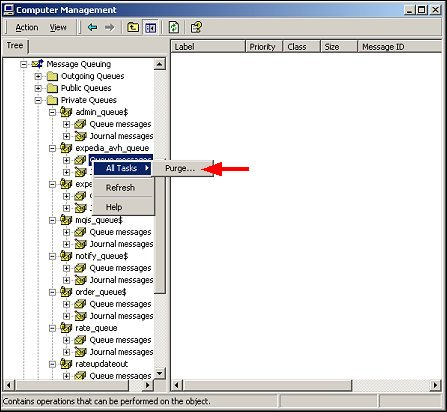
While you can purge the full queue:
Computer Management -> Services and Applications -> Message Queuing
Select your private queue, right click, All Tasks -> Purge
You may want to only purge the "old" messages.
Depending on your application, "old" could be seconds, minutes or hours.
The following PowerShell script will iterate over your private queues and remove "old" messages.
You can set the definition of "old" and you can preview the messages without removing.
###
# remove old messages for all local msmq queues
# msmq = microsoft messaging queuing
#
# 20190530 122800
# add options $showMsg and $dryRun
# 20190521 122800
# initial
#
#
# config
#
[System.Reflection.Assembly]::LoadWithPartialName("System.Messaging") | Out-Null
$utf8 = new-object System.Text.UTF8Encoding
$now = Get-Date
# remove messages older than
# $old = $now.AddDays(-1)
$old = $now.AddMinutes(-10)
# show details of message to be removed
$showMsg = 1
# run without removing
$dryRun = 1
#
# run
#
# get queues
$queuePaths = Get-MsmqQueue -QueueType Private | Select -Property QueueName;
if ($dryRun)
{
echo "dry run; would be "
}
echo "removing old messages for all local msmq queues"
echo ""
echo "nbr queues: $($queuePaths.Length); checking messages older than $($old)"
$queueCounts = Get-MsmqQueue -QueueType Private | Format-Table -Property QueueName,MessageCount;
echo $queueCounts
echo ""
pause
foreach ($queuePath in $queuePaths)
{
# for proper permissions, prepend .\
$localQueuePath = ".\$($queuePath.QueueName)"
echo "queue: $localQueuePath"
$queue = New-Object System.Messaging.MessageQueue $localQueuePath
# to read ArrivedTime property
$queue.MessageReadPropertyFilter.SetAll()
# get snapshot of all messages, but uses memory, and slower
# $msgs = $queue.GetAllMessages()
# echo " $($msgs.Length) messages"
# get cursor to messages in queue
$msgs = $queue.GetMessageEnumerator2()
# add a message so can test
# $queue.Send("<test body>", "test label")
# pause
$removed = 0
# foreach ($msg in $msgs)
while ($msgs.MoveNext([timespan]::FromSeconds(1)))
{
$msg = $msgs.Current
if ($msg.ArrivedTime -and $msg.ArrivedTime -lt $old)
{
if ($showMsg)
{
echo "--------------------------------------------------"
echo "ArrivedTime: $($msg.ArrivedTime)"
echo "BodyStream:"
if ($msg.BodyStream)
{
echo $utf8.GetString($msg.BodyStream.ToArray())
}
echo "Properties:"
echo $msg | Select-Object
echo ""
}
try {
if (!$dryRun)
{
# receive ie remove message by id from queue
$queue.ReceiveById($msg.Id, [timespan]::FromSeconds(1))
}
$removed++
} catch [System.Messaging.MessageQueueException] {
$errorMessage = $_.Exception.Message
# ignore timeouts
if (!$errorMessage.ToLower().Contains("timeout"))
{
throw $errorMessage
}
}
}
}
if ($dryRun)
{
echo "dry run; would have "
}
echo "removed $removed messages from $localQueuePath"
echo ""
}
pause
#
###
View on GitHub
-End of Document-
Thanks for reading